
HTTP Injector Download For Androids And iOS For Free 2026

Description
Internet connections do not always work the same way on every network. Sometimes users need more control over how their traffic is routed, while others may want to experiment with VPNs, proxies, SSH servers, or different tunneling methods. HTTP Injector is an Android networking application designed for exactly this kind of advanced connection management.
Developed by Evozi, HTTP Injector combines VPN functionality with several tunneling technologies, including SSH, SSL/TLS, DNS tunneling, Shadowsocks, V2Ray/Xray, Hysteria, and WireGuard. The current Google Play listing describes it as a multi-protocol VPN and tunneling tool with configuration and customization options for users who want more control over their network connection.
Rather than being a simple one-button VPN, HTTP Injector gives users access to a wide range of connection settings. This makes it particularly interesting for people who already understand basic networking or want to learn how different tunneling methods work.
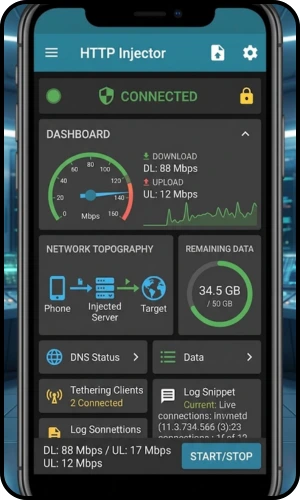
What Is HTTP Injector?
HTTP Injector is a VPN and network-tunneling application created by Evozi. Its original concept centered around HTTP proxy and SSH tunneling, but the application has expanded considerably over time. Today, it supports several tunneling technologies and lets users configure their own connection profiles. The official documentation explains concepts such as payloads, remote proxies, SSH settings, VPN service mode, and local proxy connections.
The app can therefore be used for more than ordinary VPN browsing. Depending on the configuration, users can create encrypted tunnels, connect through remote servers, modify DNS settings, use proxy servers, and manage application-specific network traffic.
HTTP Injector at a Glance
| Information | Details |
|---|---|
| App Name | HTTP Injector |
| Developer | Evozi |
| Category | VPN / Networking |
| Main Platform | Android |
| Google Play Downloads | 10M+ |
| Current Google Play Rating | About 4.4/5 |
| Main Technologies | SSH, SSL/TLS, DNS, V2Ray/Xray, WireGuard, Shadowsocks, Hysteria |
| Configuration | Manual and imported configurations |
| Payload Generator | Yes |
| App Filter | Yes |
| DNS Changer | Yes |
| In-App Purchases | Yes |
| Ads | Yes |
The Google Play listing currently shows more than 10 million downloads and describes HTTP Injector as a VPN tool supporting multiple tunneling technologies.
How Does HTTP Injector Work?
HTTP Injector works by creating a tunnel between your device and a configured remote server. Instead of simply sending traffic directly through your normal connection, the application can route it through technologies such as SSH, VPN, proxy, or other supported tunnel protocols.
The exact behavior depends on the configuration being used.
For example, an SSH configuration can contain information such as:
- SSH server address
- SSH port
- Username
- Password
- Connection mode
- Proxy information
- Payload settings
HTTP Injector’s documentation explains that its VPN Service mode can tunnel traffic through the configured server, while its root-based iptables mode provides another connection approach for supported devices.
This flexibility is one of the main reasons the application appeals to networking enthusiasts.
Main Features of HTTP Injector
1. SSH Tunneling
SSH is one of the fundamental technologies associated with HTTP Injector.
Secure Shell creates an encrypted connection between a client and a remote server. Within HTTP Injector, users can enter their SSH host, port, username, and password and configure how the tunnel should operate.
This can be useful when users have access to their own SSH server and want to route traffic through it.
2. VPN Service
The Injector can operate as a VPN on Android through the system’s VPN functionality.
This allows supported traffic to pass through the tunnel created by the application. Users do not necessarily need root access when using the VPN Service mode.
The official documentation distinguishes VPN Service mode from its root-based iptables mode.
3. SSL/TLS Tunneling
SSL/TLS support provides another method for creating protected network connections.
This option can be useful for users who need an encrypted tunnel and want to configure their connection around SSL/TLS-based networking.
4. V2Ray and Xray
It also supports modern proxy and tunneling technologies associated with V2Ray and Xray.
The current Google Play listing includes VMess, VLESS, and SOCKS configurations through the V2Ray/Xray ecosystem.
This gives advanced users additional choices when building or importing connection configurations.
5. WireGuard Support
WireGuard is another supported technology.
It is known for its modern design and relatively lightweight implementation compared with some older VPN technologies. It integrates WireGuard alongside its other connection methods, giving users another option for establishing a VPN tunnel.
6. Shadowsocks
Shadowsocks support adds another proxy-based networking option.
Users who already have a compatible Shadowsocks server or configuration can use it within the Injector rather than installing a completely separate application.
7. DNS Tunneling
DNS tunneling is also included among the supported technologies.
The current application listing mentions DNSTT and SlowDNS, while HTTP Injector also includes DNS configuration tools.
This feature is primarily relevant to advanced networking situations and should not be confused with simply changing the DNS server on a phone.
8. Hysteria
HTTP Injector supports Hysteria-based connections, including QUIC/UDP-related tunneling.
This gives experienced users another option when working with different network environments and server configurations.
9. Payload Generator
One of HTTP Injector’s distinctive features is its payload generator.
A payload contains HTTP request information that can be used as part of a configured tunneling method. The official documentation provides keywords and examples for creating payloads and recommends using the built-in Payload Generator rather than manually writing complicated payload strings.
This is particularly useful for users who are learning how HTTP requests and proxy tunneling work.
10. App Filter
HTTP Injector includes an app-filtering feature.
This allows users to control which applications use the tunnel instead of automatically routing everything through the same connection.
For people who use different network configurations for different apps, this can provide useful control over their device traffic.
11. DNS Changer
The application includes DNS-changing functionality, including support for Google DNS and custom DNS configurations.
DNS settings can affect how domain names are resolved, so this feature can be useful when troubleshooting connectivity or configuring a preferred DNS service.
12. Data Compression
HTTP Injector also provides data-compression functionality.
Compression can potentially reduce the amount of data transferred in certain situations, although the actual benefit depends on the type of traffic and server configuration.
13. Configuration Import and Export
Instead of configuring every setting manually, users can work with configuration files.
This is convenient when moving a working setup between devices or when a trusted provider supplies a configuration file.
The application also includes provider-oriented features for protecting and locking exported configurations.
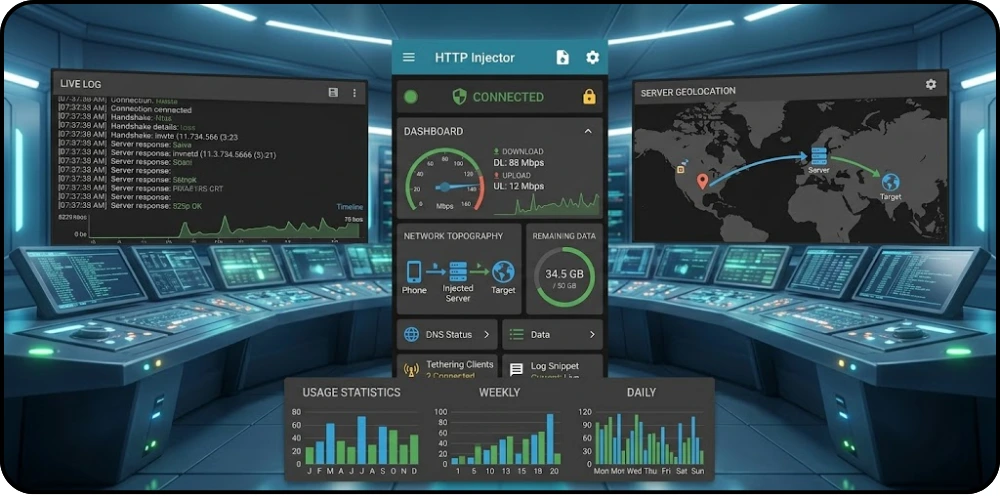
HTTP Injector Configuration Files
Configuration files are an important part of the HTTP Injector ecosystem.
A configuration can contain settings required to establish a particular tunnel. Depending on the setup, it may include server information, payload settings, proxy details, DNS preferences, or other connection parameters.
Users should be careful when importing configurations from unknown sources. A configuration should come from a source they trust, and users should understand that using an unfamiliar server means their traffic may pass through infrastructure controlled by someone else.
How to Download HTTP Injector
The safest approach is to obtain the application through an official distribution channel such as Google Play.
Android Download Steps
- Open Google Play Store.
- Search for HTTP Injector (SSH/V2ray) VPN.
- Check that the developer is listed as Evozi.
- Review the app information and permissions.
- Tap Install.
- Wait for the installation to finish.
- Open HTTP Injector and review its connection settings.
The official Google Play listing identifies Evozi as the developer and currently lists the app with 10M+ downloads.
If you download an APK from a third-party website, verify the source carefully and avoid modified or suspicious versions.
How to Use HTTP Injector
HTTP Injector is more technical than a traditional VPN application, so beginners may need some time to understand the interface.
A basic workflow looks like this:
Step 1: Install the App
Install HTTP Injector from a trusted source.
Step 2: Prepare a Configuration
You can either create your own configuration or import one that you trust.
Step 3: Select the Tunnel Type
Choose the appropriate technology, such as SSH, SSL, WireGuard, Shadowsocks, V2Ray/Xray, or another supported method.
Step 4: Configure the Server
Enter the required server details.
For an SSH setup, this can include the SSH host, port, username, and password.
Step 5: Check Your Settings
Before connecting, review the configuration carefully. A small mistake in the server address, port, authentication details, or payload can prevent the connection from working.
Step 6: Start the Connection
Use the connection button to start the tunnel.
Android may ask for permission to establish a VPN connection. Review the permission prompt before accepting it.
Step 7: Test the Connection
Once connected, test your internet connection and check whether the applications you need are working correctly.
Common HTTP Injector Problems
Like any networking application, HTTP Injector can experience connection problems. The cause is often related to the configuration rather than the app itself.
Connection Timeout
A timeout can occur when the server is unavailable, overloaded, or unreachable.
The official documentation also notes that a slow network or remote proxy can cause connection timeouts.
400 Error
A 400 response can indicate that the payload is incorrectly formatted or cannot be understood by the remote proxy.
Check the payload and connection settings before trying again.
302 Error
According to the official HTTP Injector documentation, a 302 response can occur when an ISP redirects the request toward a captive portal.
In this situation, checking the network itself may be more useful than repeatedly changing application settings.
Authentication Failure
If the SSH username or password is incorrect, the connection will not authenticate.
Double-check your credentials and confirm that the SSH account is still active.
Slow Speed
A tunnel does not automatically make an internet connection faster. Speed can be affected by the distance to the server, server load, network quality, encryption overhead, and the selected protocol.
Trying a properly configured server closer to your location may improve performance.
Is HTTP Injector Safe?
HTTP Injector itself is a legitimate networking application developed by Evozi and distributed through Google Play. The current Play listing reports that data is encrypted in transit and provides the developer’s data-safety disclosures.
However, the safety of a VPN connection also depends on the server and configuration being used.
This is especially important when downloading configuration files from unknown websites or communities. A third-party configuration may route your traffic through a server that you do not control.
For better security:
- Download the app from a trusted source.
- Keep the application updated.
- Avoid modified APK files.
- Use servers you trust.
- Do not share SSH passwords.
- Be careful with unknown configuration files.
- Avoid entering sensitive information on suspicious websites.
- Review VPN permissions before connecting.
HTTP Injector vs. Traditional VPN Apps
A traditional VPN application is usually designed around simplicity: select a server, press connect, and start browsing.
HTTP Injector takes a different approach.
It provides users with much greater control over the underlying connection. Users can work with SSH, proxies, payloads, DNS settings, V2Ray/Xray, WireGuard, Shadowsocks, and other technologies.
That makes HTTP Injector powerful, but it also means beginners may find it more complicated than a standard one-click VPN.
Who Should Use HTTP Injector?
HTTP Injector is particularly suitable for:
- Networking enthusiasts
- Android power users
- VPN users who want advanced configuration
- Users managing their own servers
- People learning about tunneling technologies
- Users who need support for multiple protocols
- Developers and technical users testing network configurations
It may not be the best choice for someone who simply wants a basic VPN with no configuration.
Advantages of HTTP Injector
Wide Protocol Support
The application brings several tunneling technologies together in one place.
High Customization
Users can adjust connection settings rather than relying entirely on predefined servers.
Payload Tools
The built-in payload functionality is useful for advanced HTTP tunneling configurations.
Configuration Management
Importing and exporting configurations makes it easier to maintain different setups.
Active Development
The app continues to receive updates. Google Play’s recent changelog includes security improvements, Android 16 support, XHTTP, SS 2022, updated networking components, and bug fixes.
Disadvantages to Consider
HTTP Injector’s biggest advantage—its flexibility—can also make it difficult for beginners.
Some configurations require knowledge of:
- SSH
- Proxy servers
- DNS
- HTTP headers
- VPN routing
- Server ports
- Authentication
- Tunnel protocols
A poorly configured tunnel may provide no useful connection at all, and using an unreliable third-party server can result in poor performance or privacy concerns.
Frequently Asked Questions
What is HTTP Injector?
HTTP Injector is a VPN and networking application developed by Evozi that supports multiple tunneling and proxy technologies.
Is HTTP Injector free?
The application is available on Google Play with ads and in-app purchases listed by the developer.
Does HTTP Injector require root?
Not necessarily. Its VPN Service mode can be used without root, while its iptables-based mode requires root access.
Does HTTP Injector support WireGuard?
Yes. WireGuard is listed among the supported tunnel types in the current Google Play description.
Does HTTP Injector support V2Ray?
Yes. The application supports V2Ray/Xray technologies, including VMess, VLESS, and SOCKS configurations.
Can I use my own server?
Yes. HTTP Injector is designed to give users control over their server and connection configurations, including SSH and other supported tunnel technologies.
Is HTTP Injector suitable for beginners?
Beginners can use it, but the large number of configuration options means it has a steeper learning curve than a basic VPN application.
Why does HTTP Injector disconnect?
Disconnects can be caused by an unstable internet connection, an overloaded or unavailable server, incorrect configuration, authentication problems, or protocol compatibility issues.
Final Verdict
HTTP Injector has developed from a specialized HTTP/SSH tunneling application into a much broader networking and VPN toolkit. Its support for SSH, SSL/TLS, DNS tunneling, V2Ray/Xray, WireGuard, Shadowsocks, Hysteria, proxies, and customizable configurations gives advanced Android users considerable freedom.
Its main strength is control. Instead of hiding the networking process behind a simple connect button, HTTP Injector exposes many of the tools and settings that experienced users need.
At the same time, that flexibility means it is not an ordinary beginner-focused VPN. Users should understand the configuration they are importing, choose servers carefully, and download the application from a trustworthy source.
For Android users interested in learning about VPN tunneling, SSH connections, proxies, and advanced network configuration, HTTP Injector remains a feature-rich option worth exploring.